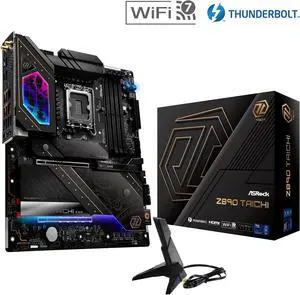
Overview
The ASRock Z890 Taichi is a flagship ATX motherboard built on the Z890 chipset for Intel Core Ultra (Arrow Lake) processors. With 22+1+2 power stages, 6x M.2 slots, and DDR5 support up to 256GB, it targets enthusiasts and power users who demand premium features and rock-solid reliability.
Full Specifications
| Socket | LGA 1851 |
| Chipset | Z890 |
| Form Factor | ATX |
| Memory | DDR5, 4 DIMM slots, up to 256GB |
| PCIe Slots | 1x PCIe 5.0 x16, 1x PCIe 4.0 x16 (x4 mode) |
| M.2 Slots | 6x M.2 |
| SATA Ports | 4 |
| Rear USB | 12x USB (incl. Thunderbolt 4) |
| WiFi | WiFi 7 |
| Bluetooth | BT 5.4 |
| LAN | 5G+2.5G |
| Audio | ALC4082 |
| Power Phases | 22+1+2 |
Design & Build Quality
ASRock has pulled out all the stops on the ASRock Z890 Taichi. The board features an extensive heatsink array covering the VRM, chipset, and M.2 slots, with a premium aesthetic that includes brushed metal accents and subtle RGB integration. The PCB is a high-quality multi-layer design built for signal integrity at high frequencies, and the overall build quality is immediately apparent when you handle the board.
VRM & Power Delivery
The 22+1+2 power stage design is seriously impressive. This VRM can handle sustained heavy overclocking on even the most demanding processors without breaking a sweat.
Connectivity & I/O
WiFi 7 brings tri-band support, 320 MHz channels, and Multi-Link Operation (MLO) for blazing wireless speeds and reduced latency — ideal for competitive gaming and large file transfers. 5 Gigabit Ethernet provides excellent wired speeds for NAS and local network transfers. The rear panel features 12x USB (incl. Thunderbolt 4), providing ample connectivity for peripherals, external storage, and high-speed devices.
Pros & Cons
Pros
- Excellent VRM with 22+1+2 power stages for overclocking headroom
- Generous 6x M.2 slots for extensive NVMe storage
- Latest WiFi 7 for future-proof wireless connectivity
- Thunderbolt 4 support for ultra-fast data transfer and peripherals
- 5 Gigabit Ethernet for high-speed wired networking
Cons
- Premium pricing that may be hard to justify for non-enthusiasts
Who Should Buy This Board?
Enthusiasts and power users who want the absolute best Intel Core Ultra (Arrow Lake) platform experience. Content creators running heavy workloads, competitive overclockers, and builders who refuse to compromise on features or build quality.
Build Tips & Recommendations
- LGA 1851 shares the same mounting pattern as LGA 1700, so existing LGA 1700 coolers will work without modification.
- Enable XMP 3.0 in BIOS to run your DDR5 kit at rated speeds. DDR5-6000 to DDR5-6400 offers the best performance-per-dollar for most users.
- With 6x M.2 slots available, install your OS on the primary M.2 slot (closest to the CPU) for maximum speed. Check your board's manual before filling the remaining slots — on many boards a second or third drive disables a SATA port or drops the graphics slot to x8.
- The spec table counts the six sockets on the board itself. ASRock also ships an M.2 Expansion Card that adds four more, but it is not the same thing: its sockets run at "PCIe Gen4x1 (16 Gb/s) mode" against the board's own "PCIe Gen4x4 (64 Gb/s)" sockets, a quarter of the bandwidth. The card goes in PCIE2, and the manual warns twice that "If PCIE2 is occupied, M2_4 will be disabled" — so it is a net gain of three drives, not four. You also have to set "PCIE2 Bifurcation" to Enabled in UEFI before the card works at all. (ASRock Z890 Taichi user manual, sections 1.2 and 1.7, checked 2026-09-07.)
- Any standard ATX mid-tower or full-tower case will work. Ensure your case has sufficient fan mounting points and front panel USB headers that match this board's internal connectors.
- Always update to the latest BIOS before installing components for the best compatibility, especially with newer CPUs and RAM kits. Download the BIOS file to a USB drive and use the flashback feature if available.
Video Review
Related Boards
Already own this board? The LGA 1851 upgrade path covers which processors this socket still takes, when a firmware update has to come first, and how much upgrade life the platform has left.
Weighing two boards? Compare this board side by side with the first one below, then swap in anything else from the dropdowns.