Overview
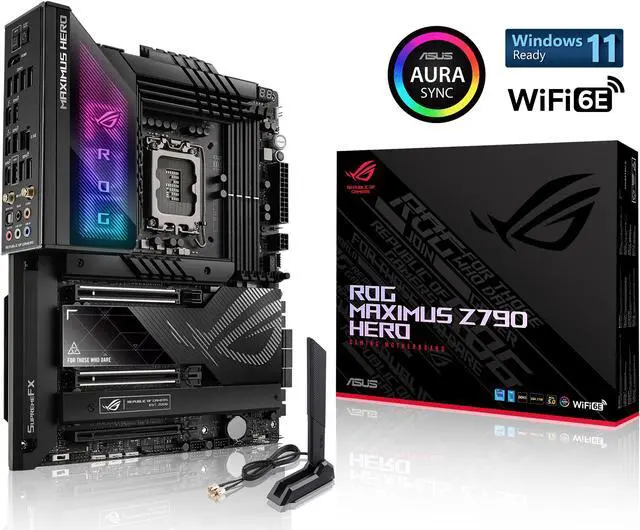
The ASUS ROG Maximus Z790 Hero is a flagship ATX motherboard built on the Z790 chipset for Intel 12th/13th/14th Gen processors. With 20+1 power stages, 3x M.2 slots on the board itself plus two more on the bundled ROG Hyper M.2 card, and DDR5 support up to 192GB, it targets enthusiasts and power users who demand premium features and rock-solid reliability.
Full Specifications
| Socket | LGA 1700 |
| Chipset | Z790 |
| Form Factor | ATX |
| Memory | DDR5, 4 DIMM slots, up to 192GB |
| PCIe Slots | 1x PCIe 5.0 x16, 1x PCIe 4.0 x16 |
| M.2 Slots | 3x M.2 (+2 via bundled ROG Hyper M.2 card) |
| SATA Ports | 6 |
| Rear USB | 12x USB (incl. Thunderbolt 4) |
| WiFi | WiFi 6E |
| Bluetooth | BT 5.3 |
| LAN | 2.5G |
| Audio | ALC4082 |
| Power Phases | 20+1 |
Design & Build Quality
ASUS has pulled out all the stops on the ASUS ROG Maximus Z790 Hero. The board features an extensive heatsink array covering the VRM, chipset, and M.2 slots, with a premium aesthetic that includes brushed metal accents and subtle RGB integration. The PCB is a high-quality multi-layer design built for signal integrity at high frequencies, and the overall build quality is immediately apparent when you handle the board.
VRM & Power Delivery
The 20+1 power stage design is seriously impressive. This VRM can handle sustained heavy overclocking on even the most demanding processors without breaking a sweat.
Connectivity & I/O
WiFi 6E extends into the clean 6GHz band, reducing congestion and improving latency compared to standard WiFi 6. 2.5 Gigabit Ethernet provides excellent wired speeds for NAS and local network transfers. The rear panel features 12x USB (incl. Thunderbolt 4), providing ample connectivity for peripherals, external storage, and high-speed devices.
Pros & Cons
Pros
- Excellent VRM with 20+1 power stages for overclocking headroom
- 3x M.2 slots on the board, with two more available on the bundled ROG Hyper M.2 card
- WiFi 6E provides fast, reliable wireless networking
- Thunderbolt 4 support for ultra-fast data transfer and peripherals
- 2.5 Gigabit Ethernet for high-speed wired networking
Cons
- Premium pricing that may be hard to justify for non-enthusiasts
Who Should Buy This Board?
Enthusiasts and power users who want the absolute best Intel 12th/13th/14th Gen platform experience. Content creators running heavy workloads, competitive overclockers, and builders who refuse to compromise on features or build quality.
Build Tips & Recommendations
- Use an LGA 1700 compatible cooler or an adapter bracket. Most modern tower coolers and AIOs include LGA 1700 mounting hardware.
- Enable XMP 3.0 in BIOS to run your DDR5 kit at rated speeds. DDR5-6000 to DDR5-6400 offers the best performance-per-dollar for most users.
- With 3x M.2 slots on the board, install your OS on the primary M.2 slot (closest to the CPU) for maximum speed. Check your board's manual before filling the remaining slots — on many boards a second or third drive disables a SATA port or drops the graphics slot to x8. If you need more than three, the bundled ROG Hyper M.2 card adds two further slots but occupies a PCIe slot to do it.
- Any standard ATX mid-tower or full-tower case will work. Ensure your case has sufficient fan mounting points and front panel USB headers that match this board's internal connectors.
- Always update to the latest BIOS before installing components for the best compatibility, especially with newer CPUs and RAM kits. Download the BIOS file to a USB drive and use the flashback feature if available.
Video Review
Related Boards
Already own this board? The LGA 1700 upgrade path covers which processors this socket still takes, when a firmware update has to come first, and how much upgrade life the platform has left.
Weighing two boards? Compare this board side by side with the first one below, then swap in anything else from the dropdowns.