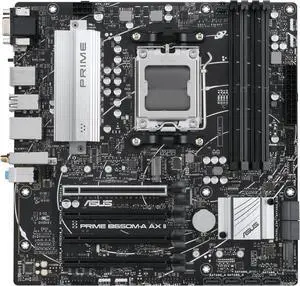
Overview
The ASUS Prime B650M-A AX II is a budget Micro-ATX motherboard built on the B650 chipset for AMD Ryzen 7000/9000 processors. With 10+2 power stages, 2x M.2 slots, and DDR5 support up to 128GB, it delivers the essentials for cost-effective builds without cutting critical corners.
Security advisory: check your BIOS
AMD published bulletin AMD-SB-7064 on 11 August 2026. It covers two high-severity flaws in AMD's firmware TPM: CVE-2026-6726, an information-leakage flaw that lets a forged TPM key be certified as genuine, and CVE-2026-6727, a timing side-channel. AMD scores them 8.5 and 8.3 on CVSS 4.0. Affected processors run from Ryzen 3000 to Ryzen 9000, plus Threadripper, Ryzen AI and Ryzen Embedded parts. Both attacks need local privileged access, so neither is remotely exploitable. The underlying flaw is in the Trusted Computing Group's TPM 2.0 reference code, which AMD ships as fTPM.
The fix arrives as a motherboard BIOS update. Windows Update will not install it. Find this board in ASUS's Download Center, open Driver & Tools and then BIOS & Firmware, install the latest BIOS, then look for an fTPM or TPM security fix in the release notes. Coverage varies by board, and we have not verified that a fixed BIOS exists for this one.
Before you flash: if this machine uses BitLocker, save your recovery key first. A firmware update can trigger BitLocker recovery, and Windows will then ask for a 48-digit key before it unlocks the drive. Our BIOS update guide covers the safe order.
Advisory added 2026-08-20.
Full Specifications
| Socket | AM5 |
| Chipset | B650 |
| Form Factor | Micro-ATX |
| Memory | DDR5, 4 DIMM slots, up to 128GB |
| PCIe Slots | 1x PCIe 4.0 x16 |
| M.2 Slots | 2x M.2 |
| SATA Ports | 4 |
| Rear USB | 7x USB |
| WiFi | WiFi 6E |
| Bluetooth | BT 5.2 |
| LAN | 2.5G |
| Audio | ALC897 |
| Power Phases | 10+2 |
Design & Build Quality
The ASUS Prime B650M-A AX II keeps things practical. The PCB is clean and the layout is straightforward, with essential heatsinking on the VRM. At this price point, you won't find extensive thermal armor or RGB, but ASUS has made sensible design choices that prioritize function over flash.
VRM & Power Delivery
The 10+2 power delivery is appropriate for the board's target audience. It handles stock operation and moderate power draw processors without issue. If you're running a mid-tier processor at stock speeds, you'll have no concerns. Just avoid pairing it with the most power-hungry flagship CPUs.
Connectivity & I/O
WiFi 6E extends into the clean 6GHz band, reducing congestion and improving latency compared to standard WiFi 6. 2.5 Gigabit Ethernet provides excellent wired speeds for NAS and local network transfers. The rear panel features 7x USB, providing ample connectivity for peripherals, external storage, and high-speed devices.
Pros & Cons
Pros
- Adequate 10+2 power delivery for the target audience
- WiFi 6E provides fast, reliable wireless networking
- 2.5 Gigabit Ethernet for high-speed wired networking
- Outstanding value for the feature set offered
Cons
- Basic ALC897 audio codec — consider a USB DAC for critical listening
Who Should Buy This Board?
Budget builders, office PC upgrades, and first-time builders entering the AMD Ryzen 7000/9000 platform. Delivers the essential features needed for everyday computing, light gaming, and entry-level workstation tasks without breaking the bank.
Build Tips & Recommendations
- AM5 retains the AM4 cooler mounting holes, so your existing AM4 cooler will work. Just make sure to use the AM5 backplate that comes with the motherboard.
- For AMD AM5, DDR5-6000 CL30 is the sweet spot for Ryzen — it aligns with the Infinity Fabric 1:1 ratio for optimal performance. Enable EXPO in BIOS after installing.
- Install your primary NVMe SSD in the top M.2 slot closest to the CPU socket for the fastest connection. The 2x M.2 configuration is sufficient for most builds.
- This Micro-ATX board fits both Micro-ATX and ATX cases. If building in a smaller case, verify GPU length clearance before purchasing a large graphics card.
- Always update to the latest BIOS before installing components for the best compatibility, especially with newer CPUs and RAM kits. Download the BIOS file to a USB drive and use the flashback feature if available.
Video Review
Related Boards
Already own this board? The AM5 upgrade path covers which processors this socket still takes, when a firmware update has to come first, and how much upgrade life the platform has left.
Weighing two boards? Compare this board side by side with the first one below, then swap in anything else from the dropdowns.