Overview
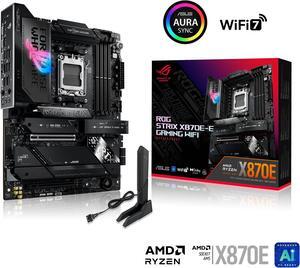
The ASUS ROG Strix X870E-E Gaming WiFi is a flagship ATX motherboard built on the X870E chipset for AMD Ryzen 7000/9000 processors. With 18+2 power stages, 5x M.2 slots, and DDR5 support up to 256GB, it targets enthusiasts and power users who demand premium features and rock-solid reliability.
Check the whole model string before you buy. ASUS also sells a ROG Strix X870E-E Gaming WiFi7 Neo, and it is a different board despite the near-identical name — our explainer on the ASUS Neo suffix sets out what the suffix marks.
Security advisory: check your BIOS
AMD published bulletin AMD-SB-7064 on 11 August 2026. It covers two high-severity flaws in AMD's firmware TPM: CVE-2026-6726, an information-leakage flaw that lets a forged TPM key be certified as genuine, and CVE-2026-6727, a timing side-channel. AMD scores them 8.5 and 8.3 on CVSS 4.0. Affected processors run from Ryzen 3000 to Ryzen 9000, plus Threadripper, Ryzen AI and Ryzen Embedded parts. Both attacks need local privileged access, so neither is remotely exploitable. The underlying flaw is in the Trusted Computing Group's TPM 2.0 reference code, which AMD ships as fTPM.
The fix arrives as a motherboard BIOS update. Windows Update will not install it. Find this board in ASUS's Download Center, open Driver & Tools and then BIOS & Firmware, install the latest BIOS, then look for an fTPM or TPM security fix in the release notes. Coverage varies by board, and we have not verified that a fixed BIOS exists for this one.
Before you flash: if this machine uses BitLocker, save your recovery key first. A firmware update can trigger BitLocker recovery, and Windows will then ask for a 48-digit key before it unlocks the drive. Our BIOS update guide covers the safe order.
Advisory added 2026-08-20.
Full Specifications
| Socket | AM5 |
| Chipset | X870E |
| Form Factor | ATX |
| Memory | DDR5, 4 DIMM slots, up to 256GB |
| PCIe Slots | 1x PCIe 5.0 x16, 1x PCIe 4.0 x16 (x4 mode) |
| M.2 Slots | 5x M.2 |
| SATA Ports | 4 |
| Rear USB | 13x USB (incl. USB4) |
| WiFi | WiFi 7 |
| Bluetooth | BT 5.4 |
| LAN | 5G |
| Audio | ALC4080 |
| Power Phases | 18+2 |
Slot Sharing & Conflicts
Every M.2 and PCIe slot draws its lanes from either the CPU or the chipset, and on this board some of them share. Filling one slot can slow another, and the board gives you no warning when it happens. The table below is for Ryzen 9000 and 7000 series processors; see the note underneath if you are running a Ryzen 8000 series chip.
| Slot | Connected to | Link | What it costs you |
|---|---|---|---|
| M.2_1 | CPU | PCIe 5.0 x4 | Nothing. Fill this one first. |
| M.2_2 | CPU | PCIe 5.0 x4 | Graphics slot drops to x8. |
| M.2_3 | CPU | PCIe 5.0 x4 | Graphics slot drops to x8. |
| M.2_4 | Chipset | PCIe 4.0 x4 | Nothing. |
| M.2_5 | Chipset | PCIe 4.0 x4 | Nothing. |
ASUS spells this out three separate times. First: "M.2_2 & M.2_3 slots share bandwidth with PCIEX16(G5). When M.2_2 & M.2_3 are occupied with SSD devices, PCIEX16(G5) will run in x8 mode." Then, in case that reads as needing both: "When M.2_2 is enabled, but M.2_3 is not in use, PCIEX16_(G5) will run in x8 mode" — and the mirror of it for M.2_3. A single drive in either slot is enough to halve the graphics link. If you want the full x16, put your second and third drives in M.2_4 and M.2_5. Our PCIe guide explains why half the lanes on a modern generation still carries plenty of bandwidth.
There is a second surprise if you are running a Ryzen 8000 series processor. ASUS lists M.2_2 and M.2_3 as "Not supports" on those chips, with the note "M.2_2 & M.2_3 will be disabled when using AMD Ryzen™ 8000 Series Desktop Processors." A drive fitted there will not run slowly — it will not appear at all. On an 8000 series chip this is a three-slot board.
Source: ASUS ROG Strix X870E-E Gaming WiFi specifications, checked 2026-09-01.
Design & Build Quality
ASUS has pulled out all the stops on the ASUS ROG Strix X870E-E Gaming WiFi. The board features an extensive heatsink array covering the VRM, chipset, and M.2 slots, with a premium aesthetic that includes brushed metal accents and subtle RGB integration. The PCB is a high-quality multi-layer design built for signal integrity at high frequencies, and the overall build quality is immediately apparent when you handle the board.
VRM & Power Delivery
The 18+2 power stage design is seriously impressive. This VRM can handle sustained heavy overclocking on even the most demanding processors without breaking a sweat.
Connectivity & I/O
WiFi 7 brings tri-band support, 320 MHz channels, and Multi-Link Operation (MLO) for blazing wireless speeds and reduced latency — ideal for competitive gaming and large file transfers. 5 Gigabit Ethernet provides excellent wired speeds for NAS and local network transfers. The rear panel features 13x USB (incl. USB4), providing ample connectivity for peripherals, external storage, and high-speed devices.
Pros & Cons
Pros
- Excellent VRM with 18+2 power stages for overclocking headroom
- Generous 5x M.2 slots for extensive NVMe storage
- Latest WiFi 7 for future-proof wireless connectivity
- 5 Gigabit Ethernet for high-speed wired networking
- PCIe 5.0 GPU slot for next-generation graphics card bandwidth
Cons
- Premium pricing that may be hard to justify for non-enthusiasts
Who Should Buy This Board?
Enthusiasts and power users who want the absolute best AMD Ryzen 7000/9000 platform experience. Content creators running heavy workloads, competitive overclockers, and builders who refuse to compromise on features or build quality.
Build Tips & Recommendations
- AM5 retains the AM4 cooler mounting holes, so your existing AM4 cooler will work. Just make sure to use the AM5 backplate that comes with the motherboard.
- For AMD AM5, DDR5-6000 CL30 is the sweet spot for Ryzen — it aligns with the Infinity Fabric 1:1 ratio for optimal performance. Enable EXPO in BIOS after installing.
- With 5x M.2 slots available, install your OS in M.2_1 for maximum speed. Before you fill the rest, check the Slot Sharing table above — a drive in either M.2_2 or M.2_3 drops the graphics slot to x8, so M.2_4 and M.2_5 are the better second and third choices.
- Any standard ATX mid-tower or full-tower case will work. Ensure your case has sufficient fan mounting points and front panel USB headers that match this board's internal connectors.
- Always update to the latest BIOS before installing components for the best compatibility, especially with newer CPUs and RAM kits. Download the BIOS file to a USB drive and use the flashback feature if available.
Video Review
Related Boards
Already own this board? The AM5 upgrade path covers which processors this socket still takes, when a firmware update has to come first, and how much upgrade life the platform has left.
Weighing two boards? Compare this board side by side with the first one below, then swap in anything else from the dropdowns.